TODAY JAVA SCHOOL

In java school, programming, design, computer general knowledge, web application, software, web services, social media, digital marketing, oops, concept of programming language, oops feature, console media, graphics medium, first programming, c, c ++ , Java, PHP, SQL, MySQL, HTML, HTML_5, J_query, JavaScript, Bootstrap, Framework, images with logos, examples, shared and explained.

https://www.amazon.in/b?node=26373545031&linkCode=ll2&tag=1234567801cdb-21&linkId=3b9882431b00409b44141e0344b35a15&language=en_IN&ref_=as_li_ss_tl

Breaking

Showing posts with label Java with OOP'S. Show all posts

Monday, 20 April 2020

April 20, 2020

Types Of Package In Java | How to Import Predefined & Userdefined Package In Java

Types of packages

There are two types of java package and they are:
   ·       Built in package
   ·       User define package
Userdefined & Predefined Package
Fig: Types of Package


    1.    Built-in-Packages:-


These packages consist of a large number of classes which are a part of Java API.Some of the commonly used built-in packages are:
package api
Fig: Built in package

1) java.lang: Contains language support classes(e.g classed which defines primitive data types, math operations). This package is automatically imported.


2)  java.io: Contains classed for supporting input / output operations.


3)  java.util: Contains utility classes which implement data structures like Linked List, Dictionary and support ; for Date / Time operations.


4)  java.applet: Contains classes for creating Applets.


5)  java.awt: Contain classes for implementing the components for graphical user interfaces (like button , ;menus etc).


6)  java.net: Contain classes for supporting networking operations.


2.   User-defined-packages:-


These are the packages that are defined by the user. First we create a directory myPackage (name should be same as the name of the package). Then create the MyClass inside the directory with the first statement being the package names.

April 20, 2020

Java Object Finalize Method | Can we Call Finalize Method In Java | java Object Finalize Method In Hindi


Java Object finalize() Method


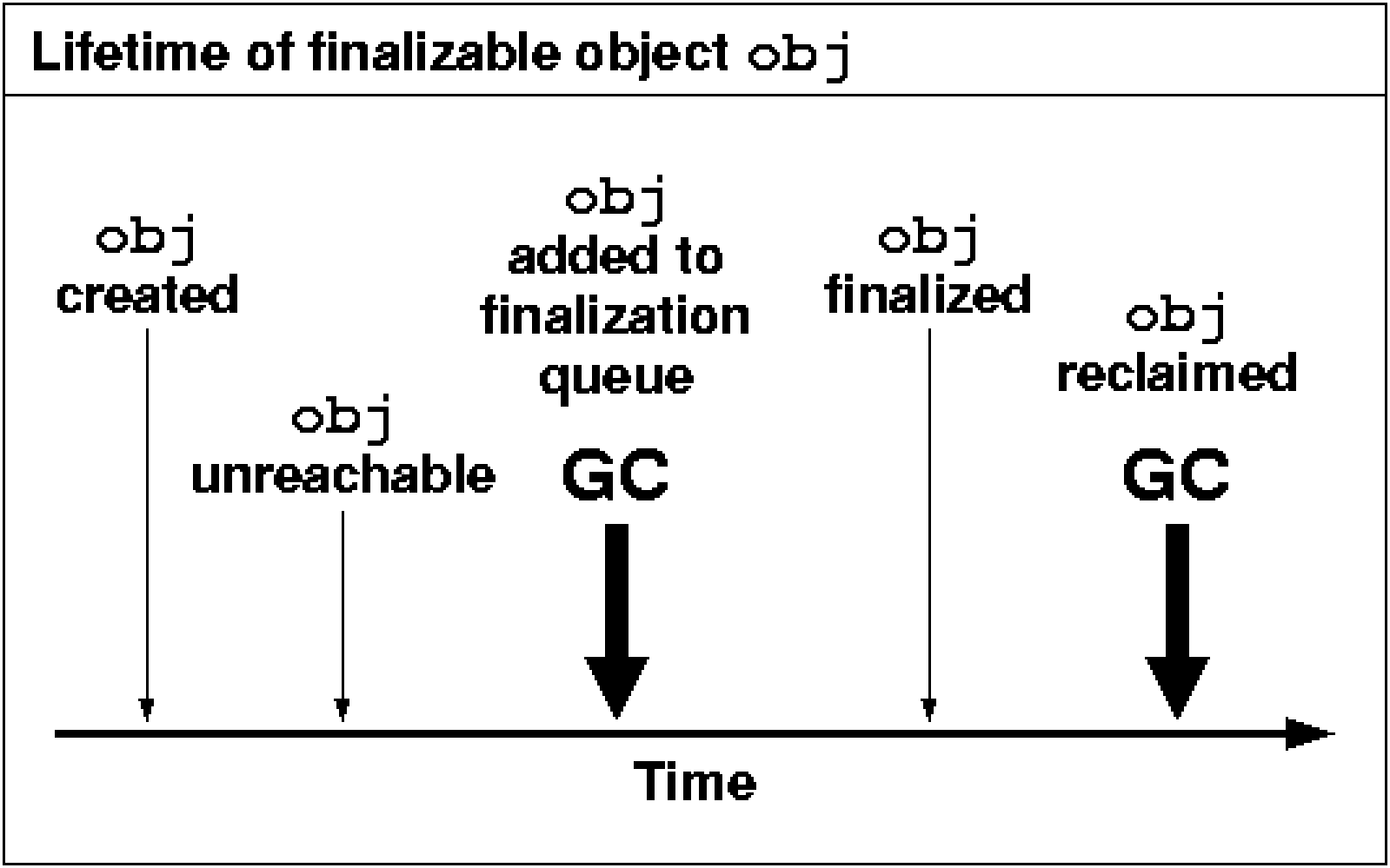
Finalize() is the method of Object class. This method is called just before an object is garbage collected. finalize() method overrides to dispose system resources, perform clean-up activities and minimize memory leaks.

java object finalize method

Fig: Finalize In Java

Syntax:

protected void finalize() throws Throwable
Throw
Throwable - the Exception is raised by this method

Example

public class JavafinalizeExample1 {  
     public static void main(String[] args)   
    {   
        JavafinalizeExample1 obj = new JavafinalizeExample1();   
        System.out.println(obj.hashCode());   
        obj = null;   
        // calling garbage collector    
        System.gc();   
        System.out.println("end of garbage collection");   
  
    }   
    @Override  
    protected void finalize()   
    {   
        System.out.println("finalize method called");   
    }   
} 

Output:

2018699554
End of garbage collection

finalize method called 
April 20, 2020

How To Access Package From Another Package

How to access package from another package


There are three ways to access the package from outside the package.
1.    import package.*;
2.    import package.classname;
3.    fully qualified name.
using package name

Fig Access Package Form Another Package 

1) Using packagename.*

If you use package.* then all the classes and interfaces of this package will be accessible but not subpackages.
The import keyword is used to make the classes and interface of another package accessible to the current package.

Example of package that import the packagename.*

     //save by A.java  
     package pack;  
     public class A{  
     public void msg(){System.out.println("Hello");}  
     }    
//save by B.java  
package mypack;  
import pack.*; 
class B{  
  public static void main(String args[]){  
   A obj = new A();  
   obj.msg();  
  }  
}  

Output:Hello

2) Using packagename.classname

If you import package.classname then only declared class of this package will be accessible.

Example of package by import package.classname

     //save by A.java  
     package pack;  
     public class A{  
     public void msg(){System.out.println("Hello");}  
    }  
    //save by B.java    
    package mypack;  
    import pack.A;  
     class B{  
     public static void main(String args[]){  
      A obj = new A();  
     obj.msg();  
     }  

}  Output:Hello

3) Using fully qualified name

If you use fully qualified name then only declared class of this package will be accessible. Now there is no need to import. But you need to use fully qualified name every time when you are accessing the class or interface.
It is generally used when two packages have same class name e.g. java.util and java.sql packages contain Date class.

Example of package by import fully qualified name

    //save by A.java   
    package pack;  
    public class A{  
    public void msg(){System.out.println("Hello");}  
     }  
    //save by B.java   
     package mypack;  
     class B{  
     public static void main(String args[]){  
      pack.A obj = new pack.A();//using fully qualified name  
       obj.msg();  
      }  

Output:Hello

Sunday, 19 April 2020

April 19, 2020

Introduction Of JSP In Java | What Is JSP In Java | JSP In Java In Hindi

                       Introduction  Of JSP

 JSP technology is used to create web application just like Servlet technology. It can be thought of as an extension to Servlet because it provides more functionality than servlet such as expression language, JSTL, etc.

A JSP page consists of HTML tags and JSP tags. The JSP pages are easier to maintain than Servlet because we can separate designing and development. It provides some additional features such as Expression Language, Custom Tags, etc.

image of jsp in java


Fig: Introduction Of JSP

Advantages of JSP over Servlet

There are many advantages of JSP over the Servlet. They are as follows:

1) Extension to Servlet

JSP technology is the extension to Servlet technology. We can use all the features of the Servlet in JSP. In addition to, we can use implicit objects, predefined tags, expression language and Custom tags in JSP, that makes JSP development easy.

2) Easy to maintain

JSP can be easily managed because we can easily separate our business logic with presentation logic. In Servlet technology, we mix our business logic with the presentation logic.

3) Fast Development: No need to recompile and redeploy

If JSP page is modified, we don't need to recompile and redeploy the project. The Servlet code needs to be updated and recompiled if we have to change the look and feel of the application.

4) Less code than Servlet

In JSP, we can use many tags such as action tags, JSTL, custom tags, etc. that reduces the code. Moreover, we can use EL, implicit objects, etc.


Creating a simple JSP Page

To create the first JSP page, write some HTML code as given below, and save it by .jsp extension. We have saved this file as index.jsp. Put it in a folder and paste the folder in the web-apps directory in apache tomcat to run the JSP page.


index.jsp


The simple example of JSP where we are using the scriptlet tag to put Java code in the JSP page. We will learn scriptlet tag later.
   <html>  
   <body>  
   <% out.print(2*5); %>  
   </body>  
   </html>  

How to run a simple JSP Page?

Follow the following steps to execute this JSP page:
  • Start the server
  • Put the JSP file in a folder and deploy on the server
  • Visit the browser by the URL http://localhost:portno/contextRoot/jspfile, for example, http://localhost:8888/myapplication/index.jsp


Wednesday, 15 April 2020

April 15, 2020

Thread Group In Java | Thread Group Example In Java |Thread Group In Hindi In Java

ThreadGroup in Java

Java provides a convenient way to group multiple threads in a single object. In such way, we can suspend, resume or interrupt group of threads by a single method call.

Java thread group is implemented by java.lang.ThreadGroup class.
A ThreadGroup represents a set of threads. A thread group can also include the other thread group. The thread group creates a tree in which every thread group except the initial thread group has a parent.

A thread is allowed to access information about its own thread group, but it cannot access the information about its thread group's parent thread group or any other thread groups.

example of thread group in java

Fig: Thread Group In Java 

ThreadGroup Example

File: ThreadGroupDemo.java

   public class ThreadGroupDemo implements Runnable{  
    public void run() {  
          System.out.println(Thread.currentThread().getName());  
    }  
     public static void main(String[] args) {  
      ThreadGroupDemo runnable = new ThreadGroupDemo();  
          ThreadGroup tg1 = new ThreadGroup("Parent ThreadGroup");  
            
          Thread t1 = new Thread(tg1, runnable,"one");  
          t1.start();  
          Thread t2 = new Thread(tg1, runnable,"two");  
          t2.start();  
          Thread t3 = new Thread(tg1, runnable,"three");  
          t3.start();  
               
          System.out.println("Thread Group Name: "+tg1.getName());  
         tg1.list();  
  
    }  
   }  

Output:

one
two
three
Thread Group Name: Parent ThreadGroup
java.lang.ThreadGroup[name=Parent ThreadGroup,maxpri=10]
    Thread[one,5,Paq

April 15, 2020

Thread Priority In Java | Advantage Of Thread Priority In Java | Thread Priority In Hindi

Thread Priority

Priorities are represented by a number between 1 and 10. In most
cases, thread schedular schedules the threads according to their priority
 (known as preemptive scheduling). But it is not guaranteed because it
 depends on JVM specification that which scheduling it chooses.

advantage of thread priority in java

Fig: Thread priority 


3 constants defined in Thread class:

1.    public static int MIN_PRIORITY
2.    public static int NORM_PRIORITY
3.    public static int MAX_PRIORITY


Default priority of a thread is 5 (NORM_PRIORITY). The value of
 MIN_PRIORITY is 1 and the value of MAX_PRIORITY is 10.


Example of priority of a Thread:

      class TestMultiPriority1 extends Thread{  
       public void run(){  
           System.out.println("running thread name is:"+Thread.currentThread().g            etName());  
                 System.out.println("running thread priority is:"+Thread.currentThread().getPri    ority());  
  
    }  
     public static void main(String args[]){  
    TestMultiPriority1 m1=new TestMultiPriority1();  
    TestMultiPriority1 m2=new TestMultiPriority1();  
    m1.setPriority(Thread.MIN_PRIORITY);  
    m2.setPriority(Thread.MAX_PRIORITY);  
    m1.start();  
    m2.start();  
        
   }   
      }     


Output: 

       running thread name is:Thread-0
       running thread priority is:10
       running thread name is:Thread-1
       running thread priority is:1